Crypto Payment
Let's discover Paycashpay integration quickly.
HTTP GET Request (query string)
User will be redirected to our payment page
https://api.paycashpay.com/v1/crypto/pages
Example
https://api.paycashpay.com/v1/crypto/pages?currency=USD&apikey=1234&amount=1000&transactionID=A10&description=test
HTTP GET Request
<form action="https://api.paycashpay.com/v1/crypto/pages" method="GET">
  <div>
    <input type="hidden" name="apikey" value="your apikey" required/>
    <input type="hidden" name="transactionID" required/>
    <input type="text" name="amount" placeholder="Amount" required/>
  </div>
  <div>
    <select name="currency" required>
      <option value="USD">USD</option>
      <option value="EUR">EUR</option>
      <option value="ZAR">ZAR</option>
      <option value="NGN">NGN</option>
      <option value="GHS">GHS</option>
      <option value="XOF">XOF</option>
      <option value="XAF">XAF</option>
    </select>
  </div>
  <div>
    <input type="text" placeholder="Description" name="description" />
  </div>
  <div>
    <button type="submit">Submit</button>
  </div>
</form>
Overviews
Both methods above overview
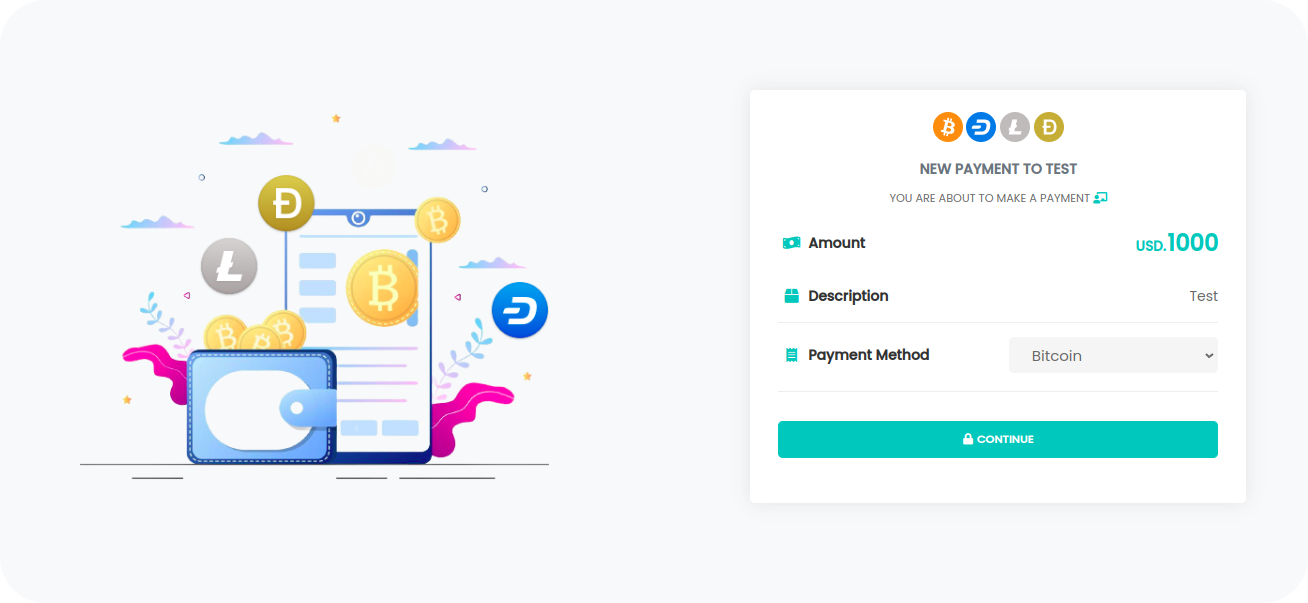
HTTP Post Request
To initiate a transaction, make a simple HTTP Post call to the PaycashPay web service with the following parameters
Data format: JSON / The server expects the following parameters.
apikey, currency, amount, network, transactionID, description
- apikey
required-----> Data Type (string) - currency
required----->NGN, GHS, XAF, XOF, ZAR, EUR, USD - amount
required-----> Data Type (number) - network
required----->BTC, LTC, DASH, DOGE - transactionID
required-----> Data Type (string) - description
optional-----> Data Type (string)
https://api.paycashpay.com/v1/crypto/payment
Answer
{
  status: 3, // request status (1, 2, 3, 4) meaning are bellow
  amount: 0.01, // coins
  address: '1BvBMSEYstWetqTFn5Au4m4GFg7xJaNVN2', // address
  network: 'BTC', // network BTC, LTC, DASH, DOGE
  QrCodeUrl: 'qr code url', // QR Code For scan payment
  txn: AD14W, // transaction identification from us
  transactionID: your transaction ID // your transaction ID
}
Status codes
Number meaning:
- 1 : Parameters Invalids
- 2 : Invalid API
- 3 : Transaction successfully registered
- 4 : A transaction with the same ID already exists.
The QrCodeUrl, is composed of the generated address and the amount, you will just insert it in an 'img' tag
txn : ID of transaction
SDK
Cryotocurrency SDK payment method, coming soon...
Payment confirmation
Once the payment is made by the customer, PaycashPay will send a confirmation message on the URL you provided webhook url (HTTP POST Request endpoint).
the structure of the notification you'll receive is the same as the verification of payment status on below.
{
  type: 'crypto',
  txn: 'Y4HFX',
  transactionID: 'KK85D',
  currency: 'XOF',
  amount: 100000,
  network: 'BTC',
  coins: 0.047,
  state: 'Confirmed',
  status: 3,
  address: 'bc1qx.............',
  hashID: '07bc9e6156.................',
  date: 'Mon, May 23, 2022 10:09 PM'
}